Description
In environments with limited or no internet access, Windows certificate checks may cause long loading times when starting the VTS Testplayer Client.
Normally, VTS offline works without restrictions even when there is no internet connection. However, Windows is typically configured to verify the digital signatures of executable files. As part of this process, it tries to download certificate revocation lists (CRLs) from public URLs provided by the issuing certification authority.
If access to these URLs is unavailable, but not explicitly blocked, the system may wait several seconds for each failed download attempt before timing out.
SCHUHFRIED follows best practices and digitally signs all executables with a strong Extended Validation (EV) code signing certificate issued by GlobalSign. While this improves security, security checks can also cause noticeable delays in restricted network environments. Loading multiple signed files may cause a cumulative delay of several minutes at the start of a test.
It is important to note that these checks are performed by the Windows operating system, not by VTS.
Troubleshooting
To verify if a system is affected, the following command can be run in a PowerShell instance:
PS> Invoke-WebRequest crl.globalsign.com -TimeoutSec 20
If the command hangs and times out after 20 seconds, the system is affected. If it completes immediately, it is likely not affected.
The following measures can help reduce delays:
1 - Allow access to *.globalsign.com (recommended)
Checking certificate revocation lists is an important security measure and should ideally stay enabled. In the case of VTS, since we use a GlobalSign certificate, this requires access to crl.globalsign.com and ocsp.globalsign.com. However, it is generally recommended to allow CRL checks for all installed root certificates. Refer to your computers certificate store.
2 - Block access to *.globalsign.com
The delay occurs because download attempts time out. If requests to *.globalsign.com are actively blocked, the delays do not happen.
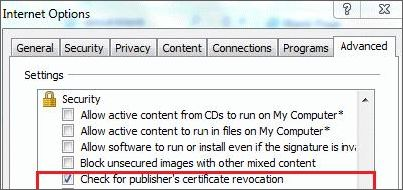
3 - Disable certificate revocation checks
On the affected machine, open Internet Options and disable Check for publisher's certificate revocation: