
Description
The export of test results in .csv format is grayed out. This affects older VTS versions prior to 8.29 (if the old VTS user interface is used).
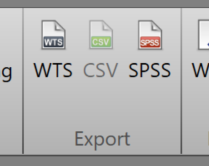
Troubleshooting
-
You must first create an export definition in the VTS under Settings → Data export/import → Manage export settings.
-
For more information, please use the VTS help function in the upper right corner (blue and white question mark icon) and search for Export Definition.
-
No additional license is required to use CSV export.