
Between versions 8.26.x and 8.27.x, the configuration file format for VIS and its plugins underwent a major change. In earlier versions, configuration was XML-based using .NET Framework 4.8. Beginning with version 8.27.x, it now uses the JSON format provided by .NET 8. This page describes the steps for upgrading a VTS with any VIS plugin (e.g., GDT, HL7, or Universal plugin) from version 8.26 or earlier to a newer version.
Beginning with version 8.27.x, VIS and all VIS plugins are configured through a single configuration file:
%PROGRAMFILES%\SCHUHFRIED GmbH\Vienna Test System 8\IntegrationService\appsettings.json
Note: This is the default installation path. If Vienna Test System was installed in a different location, the path will vary.
Each plugin has its own dedicated section within this file. When migrating existing VIS setups to a newer version, the settings from the previously separate configuration files must be transferred into these sections.
It is highly recommended to back up the existing configuration files before starting the migration.
Migrate GDT plugin configuration
To migrate the configuration of the GDT plugin, the settings of the file by default located in C:\Program Files (x86)\SCHUHFRIED GmbH\Wiener Testsystem 8\Service\Plugins\WTS.Integration.Plugins.GDT.GDTPlugin.dll.config has to be migrated into the joint configuration file appsettings.json described above.
The table below shows how settings are mapped from the old structure to the new one:
|
8.26.x File: WTS.Integration.Plugins.GDT.GDTPlugin.dll.config |
8.27.x File: appsettings.json |
|---|---|
|
(no equivalent in older versions) |
Section: GDTPlugin; Value: Enabled |
|
(no equivalent in older versions) |
Section: GDTPlugin; Value: TimeoutInSec |
|
Section: appSettings; Value: GDTSourceDirectory |
Section: GDTPlugin; Value: GDTSourceDirectory |
|
Section: appSettings; Value: GDTOutputDirectory |
Section: GDTPlugin; Value: GDTOutputDirectory |
|
Section: appSettings; Value: GDTSender |
Section: GDTPlugin; Value: GDTSender |
|
Section: appSettings; Value: GDTReceiver |
Section: GDTPlugin; Value: GDTReceiver |
|
Section: appSettings; Value: MandantName |
Section: AppSettings; Value: Service.MandantName |
|
Section: appSettings; Value: PersonDefaultLanguage |
Section: GDTPlugin; Value: PersonDefaultLanguage |
|
Section: appSettings; Value: PersonDefaultEducationLevel |
Section: GDTPlugin; Value: PersonDefaultEducationLevel (without quotes) |
|
Section: appSettings; Value: ExportRawScore |
Section: GDTPlugin; Value: ExportRawScore (without quotes) |
|
Section: appSettings; Value: PDFExportPath |
Section: GDTPlugin; Value: PDFExportPath (backslashes doubled) |
|
Same as Admin client setting “Settings –> Data export/import –> Standard folder for data export” |
Section: GDTPlugin; Value: StandardExportFolder (backslashes doubled) |
|
(no equivalent in older versions) |
Section: GDTPlugin; Value: StoreProcessedFailedFiles |
|
Section: ExportDefinitionGroup |
Section: GDTPlugin; Value: ExportDefinitionGroup (please see the picture below) |
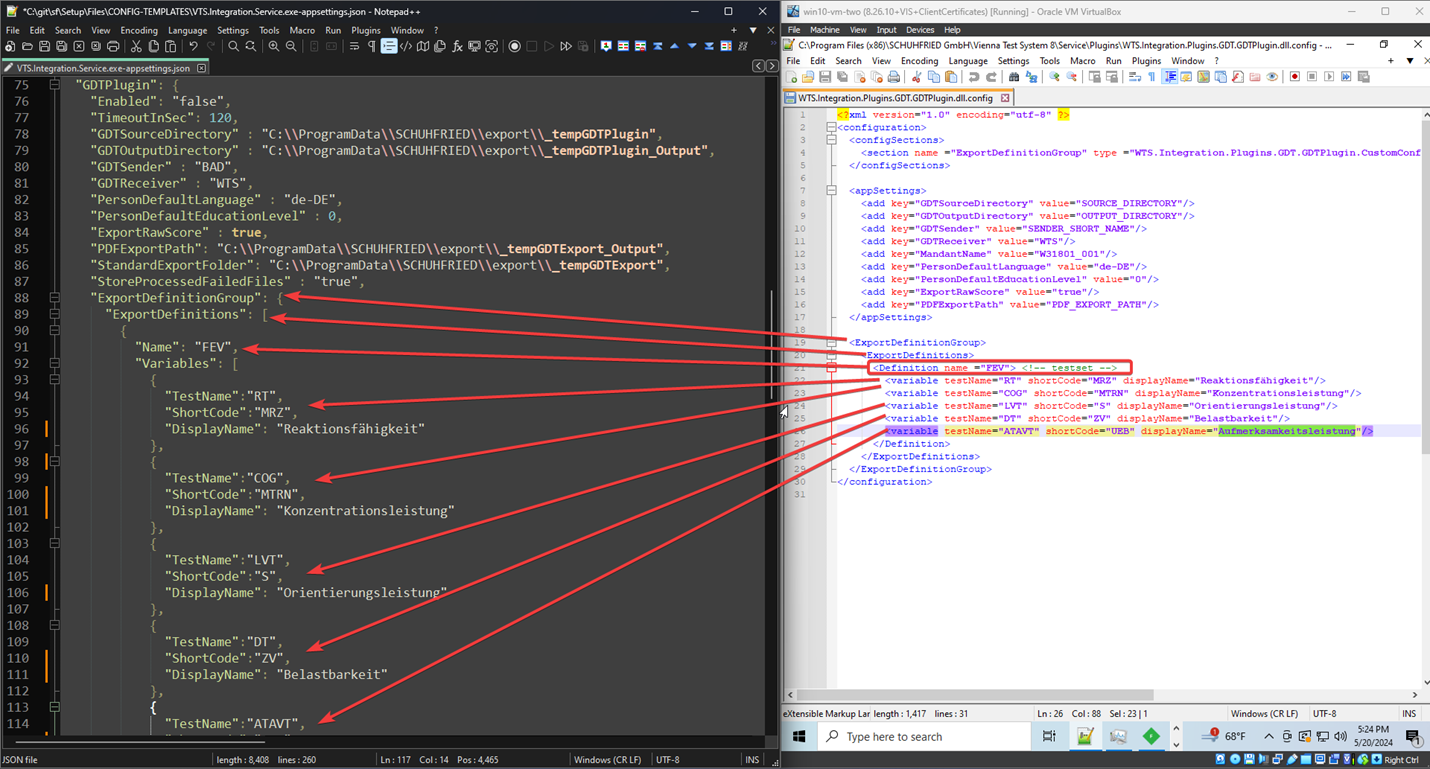
A detailed description of which values can be set in the configuration file can be found on the page: GDT plugin.
Migrate HL7 plugin configuration
To migrate the configuration of the HL7 plugin, the settings of the file by default located in C:\Program Files (x86)\SCHUHFRIED GmbH\Wiener Testsystem 8\Service\Plugins\WTS.Integration.Plugins.HL7.HL7Plugin.dll.config has to be migrated into the joint configuration file appsettings.json described above.
The table below shows how settings are mapped from the old structure to the new one:
|
8.26.x File: WTS.Integration.Plugins.HL7.HL7Plugin.dll.config |
8.27.x File: appsettings.json |
|---|---|
|
(no equivalent in older versions) |
Section: HL7Plugin; Value: Enabled |
|
Section: appSettings; Value: ReceivingApplication |
Section: HL7Plugin; Value: ReceivingApplication |
|
Section: appSettings; Value: ReceivingFacility |
Section: HL7Plugin; Value: ReceivingFacility |
|
Section: appSettings; Value: SendingApplication |
Section: HL7Plugin; Value: SendingApplication |
|
Section: appSettings; Value: SendingFacility |
Section: HL7Plugin; Value: SendingFacility |
|
Section: appSettings; Value: Mode |
Section: HL7Plugin; Value: Mode |
|
Section: appSettings; Value: FileShareBasePath |
Section: HL7Plugin; Value: FileShareBasePath (doubled backslashes) |
|
Section: appSettings; Value: TCPClientRemoteHost |
Section: HL7Plugin; Value: TCPClientRemoteHost |
|
Section: appSettings; Value: TCPClientRemotePortORU |
Section: HL7Plugin; Value: TCPClientRemotePortORU |
|
Section: appSettings; Value: TCPClientRemotePortMDM |
Section: HL7Plugin; Value: TCPClientRemotePortMDM |
|
Section: appSettings; Value: TCPListenerPort |
Section: HL7Plugin; Value: TCPListenerPort |
|
Section: appSettings; Value: TCPSendTimeout |
Section: HL7Plugin; Value: TCPSendTimeout |
|
Section: appSettings; Value: SendAck |
Section: HL7Plugin; Value: SendAck |
A detailed description of which values can be set in the configuration file can be found on the page: HL7 plugin.
Migrate Universal plugin configuration
To migrate the configuration of the Universal plugin, the settings of the file by default located in C:\Program Files (x86)\SCHUHFRIED GmbH\Wiener Testsystem 8\Service\Plugins\WTS.Integration.Plugins.Universal.UniversalPlugin.dll.config has to be migrated into the joint configuration file appsettings.json described above.
The table below shows how settings are mapped from the old structure to the new one:
|
8.26.x File: WTS.Integration.Plugins.Universal.UniversalPlugin.dll.config |
8.27.x File: appsettings.json |
|---|---|
|
(no equivalent in older versions) |
Section: UniversalPlugin; Value: Enabled |
|
Section: appSettings; Value: DefaultTestBattery |
Section: UniversalPlugin; Value: DefaultTestBattery |
|
Section: serviceCertificate; Value: x509FindType |
Section: UniversalPlugin; Value: CertificateSearchKind |
|
Section: serviceCertificate; Value: findValue |
Section: UniversalPlugin; Value: CertificateSearchValue |
|
Section: appSettings; Value: UniversalPluginAuthUserName |
Section: UniversalPlugin; Value: UsernameToVisService (optional) |
|
Section: appSettings; Value: UniversalPluginAuthPassword |
Section: UniversalPlugin; Value: PasswordToVisService (optional) |
|
Section: appSettings; Value: ImportPersonsFromCSV |
Section: ImportExportPlugin; Value: ImportPersonsFromCSV |
|
Section: appSettings; Value: ExportTestResultsToCSV |
Section: ImportExportPlugin; Value: ExportTestResultsToCSV |
|
Section: appSettings; Value: MandantName |
Section: ImportExportPlugin; Value: MandantName |
|
Section: appSettings; Value: ImportExportInterval |
Section: ImportExportPlugin; Value: ImportExportInterval (without quotes) |
|
Section: appSettings; Value: ExternToInternCandidatesMap |
Section: ImportExportPlugin; Value: ExternToInternCandidatesMap |
|
Section: appSettings; Value: ExternPersonsCsvFilePath |
Section: ImportExportPlugin; Value: ExternPersonsCsvFilePath (doubled backslashes) |
|
Section: appSettings; Value: ExportResultsCsvFilePath |
Section: ImportExportPlugin; Value: ExportResultsCsvFilePath (doubled backslashes) |
|
Section: appSettings; Value: CsvExportProfile |
Section: ImportExportPlugin; Value: CsvExportProfile Section: PisaExportPlugin; Value: CsvExportProfile |
|
Section: appSettings; Value: User |
Section: ImportExportPlugin Value: User Section: PisaExportPlugin; Value: User |
|
Section: appSettings; Value: ExportLanguage |
Section: ImportExportPlugin; Value: ExportLanguage |
|
Section: appSettings; Value: StorageFolder |
Section: ImportExportPlugin; Value: StorageFolder (double backslashes) |
|
(no equivalent in older versions) |
Section: ImportExportPlugin; Value: PortalApiAddress |
|
Section: appSettings; Value: enableClientTestresultListener |
Section: PisaExportPlugin; Value: enableClientTestresultListener (without quotes) |
|
Section: appSettings; Value: ExportInterval |
Section: PisaExportPlugin; Value: ExportInterval (without quotes) |
|
Section: appSettings; Value: Scoringmethod |
Section: PisaExportPlugin; Value: Scoringmethod |
|
Section: appSettings; Value: WordTemplateName |
Section: PisaExportPlugin; Value: WordTemplateName |
|
Section: appSettings; Value: UseWordTemplateForPDFGeneration |
Section: PisaExportPlugin; Value: UseWordTemplateForPDFGeneration (without quotes) |
|
Section: appSettings; Value: Endpoint |
Section: PisaExportPlugin; Value: Endpoint |
|
Section: appSettings; Value: SoapAction |
Section: PisaExportPlugin; Value: SoapAction |
|
Section: appSettings; Value: ClientCertificateSearchKind |
Section: PisaExportPlugin; Value: ClientCertificateSearchKind |
|
Section: appSettings; Value: ClientCertificateSearchValue |
Section: PisaExportPlugin; Value: ClientCertificateSearchValue |
A detailed description of which values can be set in the configuration file can be found on the page: Universal plugin.
The Universal plugin provides a SOAP-based web service implemented with the WCF framework, which is extensively configurable through traditional XML configuration.
In addition to the general plugin settings defined in appsettings.json, the Universal plugin therefore uses a separate configuration file for WCF-specific settings:
%PROGRAMFILES%\SCHUHFRIED GmbH\Vienna Test System 8\IntegrationService\Plugins\VTS.Integration.Plugins.Universal.dll.wcf.config
Note: This is the default installation path. If Vienna Test System was installed in a different location, the path will vary.
The default WCF configuration is designed to cover the majority of use cases and typically remains unchanged in standard deployments.