
Intended use
The Vienna Test System is SCHUHFRIED GmbH's software solution for computer-based psychological assessment. Its areas of application range from individual assessments and tests in personnel psychology to clinical neuropsychology, traffic psychology, and sports psychology.
The Vienna Test System offers a wide portfolio of tests, including intelligence test batteries, special intelligence tests, ability tests, personality tests, and aptitude and interest tests. The tests are based on both classical and modern test theories and include adaptive and multimedia formats. They are designed to ensure the most comprehensive, fair, and valid psychological testing of a person.
The VTS consists of several components that can be used as needed, depending on the use case.
This page provides an overview of the functions and structure of the VTS, its different product variants, the required licenses and available purchasing options.
Structure and program components
The VTS consists of the VTS administration software, which is required for test presentation and the management of persons, test results, settings, and licenses. The administration software also manages VTS users (adding/removing users, managing rights). Provided that the appropriate licenses are available, testing can be started, and persons can be invited for testing directly from within the administration software.
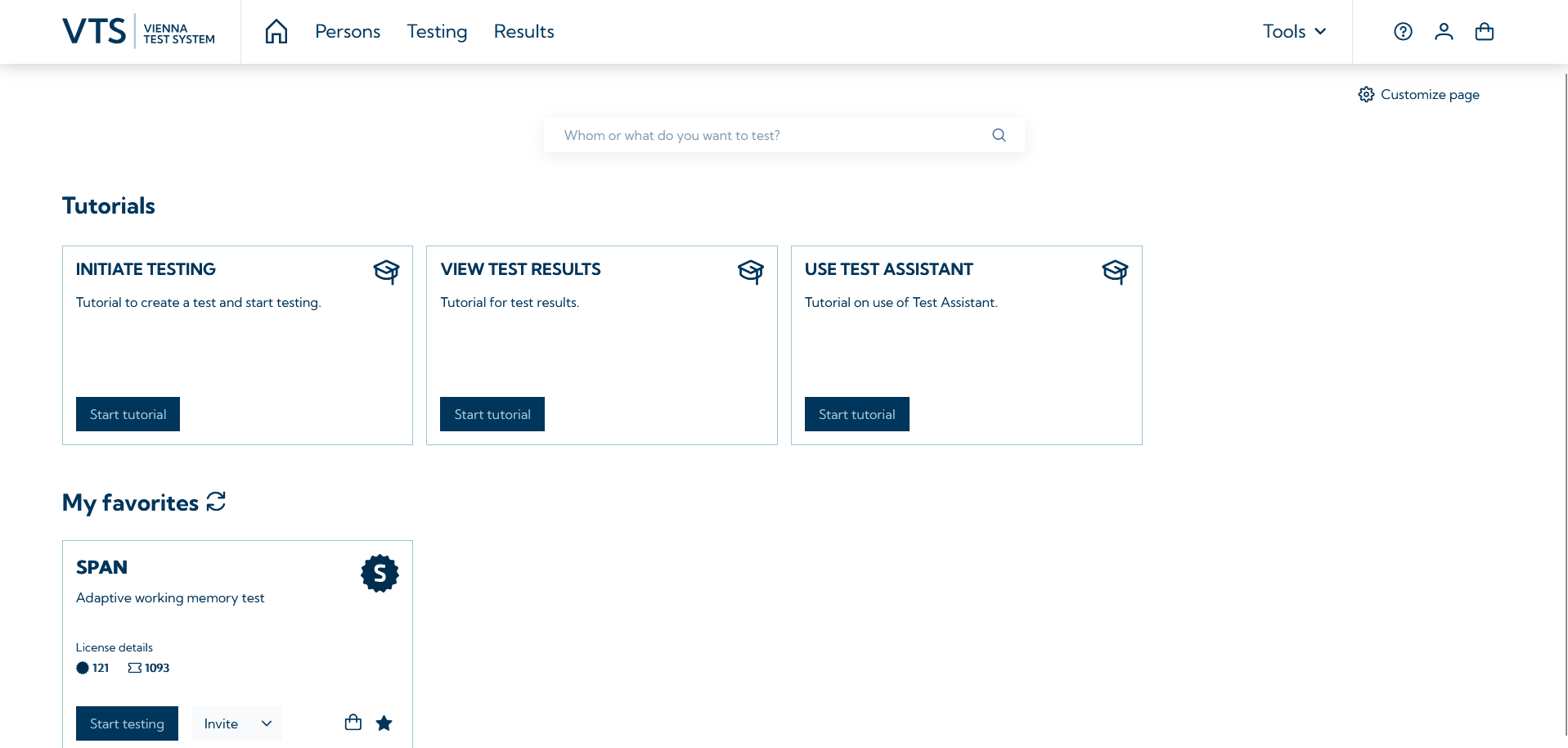
The VTS administration software includes several components necessary for using the VTS:
-
Database: SQL database for storing all relevant information and personal data or test results
-
Testplayer: Application used to conduct tests. The Testplayer is available in a browser-based version (Testplayer Web) and a version that must be installed locally (Testplayer Client).
All functions of the VTS can be managed and used in the administration software. These include:
-
Managing test takers: Creating new persons (either manually or via import), updating personal data, deleting persons → Persons page in the administration software. For more details see: Person management.
-
Presenting tests: Selecting individual tests and configuring them (selecting test forms / subtests / scales), creating test batteries, assigning tests / test batteries to persons, initiating testing sessions or generating invitation links for testing in open mode or proctored mode → Testing page in the administration software- For more details see: Testing.
-
Viewing results: Opening individual or multiple results, exporting results (PDF, .csv, VTS-format), creating reports → Results page in the administration software. For more information see: Results management.
-
VTS Tools: Create your own tests using the Test Generator, maintain control over active testings using the Progress Monitor and perform further analyses of the test results in VTS Analytics.
-
SFS Tests Solutions: Find easy-to-use, predefined test batteries for a variety of use cases and diagnostic question in the SFS Test Solutions.
-
Managing settings: Configuring test administration and scoring (e.g., generating and creating Word reports), as well as setting up email options for sending invitation links. For more information see: Settings.
You can get to know the VTS administration software with a free demo account in VTS online. Simply follow the registration process under Register for demo account.
Product variants
The VTS administration software is available in two variants: the Vienna Test System online and the Vienna Test System offline.
Vienna Test System online
The Vienna Test System online (VTS online) is SCHUHFRIED's cloud-based solution. All you need to use VTS online is internet access. There is no need to install the administration software locally on your device. You can manage all functions of the VTS administration software in your browser. You can access your data and results at any time and from anywhere. VTS online can also be used via the browser on devices that do not run on Windows operating systems.
Thanks to the cloud-based infrastructure, you benefit from regular automatic updates of VTS. Your tests are therefore always up to date and feature the latest norms and functions. Your data is automatically backed up and protected in the best possible way on European servers. The infrastructure required for the efficient use of the VTS is provided via the cloud. You don’t need to worry about whether your devices meet the system requirements for the VTS. A stable internet connection is required to use the VTS online.
The VTS online is the ideal solution for users who want to administer efficient digital psychological assessments without any installation or maintenance costs.
A local software installation may also be necessary when using VTS online, for example, to administer tests that require additional input devices. In such cases, the Testplayer Client must be installed on the device used for testing. The Testplayer Client can only be installed on devices running the Windows operating system.
Vienna Test System offline
The VTS is also available as an on-premise solution (Vienna Test System offline). With this option, you receive an installation package that includes a specific VTS version. This allows you to install the VTS locally on your PC or server system. This means that the VTS is offline and linked to your local technical infrastructure and can only be run on the licensed devices. The VTS offline is only compatible with Windows operating systems.
Since all program components are installed on your devices, you always have full control over your data. However, depending on your specific use case, you must ensure that your devices' performance and configuration are suitable for the intended use. The VTS offline can also be used without an active internet connection.
WTS offline also has the ability to communicate with other software via interfaces. Provided that the external software supports the appropriate communication protocols, persons can be created in the VTS and test results can be retrieved via the external software, for example. More detailed information can be found on the page: Integration.
Comparison of product variants
If you would like to find out which of the two variants best suits your needs, please see comparison below:
|
Function |
VTS online |
VTS offline |
|---|---|---|
|
Browser-based use of the VTS administration software (without local installation) |
|
|
|
Cloud-based infrastructure (data backup, computing power) |
|
|
|
Completely local data storage on your infrastructure (on-premise solution) |
|
|
|
Automatic updates |
|
|
|
Free updates |
|
|
|
System requirements of the VTS must be met |
|
|
|
Use of the VTS on operating systems other than Windows |
|
|
|
Online testing via email invitation |
|
|
|
Internet connection required |
|
|
|
Report generation |
|
|
|
|
|
|
|
VTS Analytics |
|
|
|
Interfaces for communication with other software (e.g., GDT, HL7, online a REST API is available) |
|
|
1 This depends on the desired application. If the tests you want to use require SCHUHFRIED hardware it is necessary to install an application (VTS Testplayer) on the PC used for testing. This application only works on Windows PCs and certain requirements must be met. Please consult the page: System requirements for additional information.
2 Online testing is only possible in VTS offline if the technical requirements are met (e.g., correct network configuration).
Update & Support
Our update & support policy can be found here.
How do I get started with VTS?
-
You can try VTS free of charge. On the homepage of VTS online, you can register for a demo account and experience the VTS administration software with a selection of tests from the SCHUHFRIED Selection. When you take the tests, however, only the instructions are presented, not the test items.
-
The VTS administration software, licenses for the tests and, if required, our hardware can be purchased via the Marketplace.