
To check how many licenses you still have available in your environment(s):
-
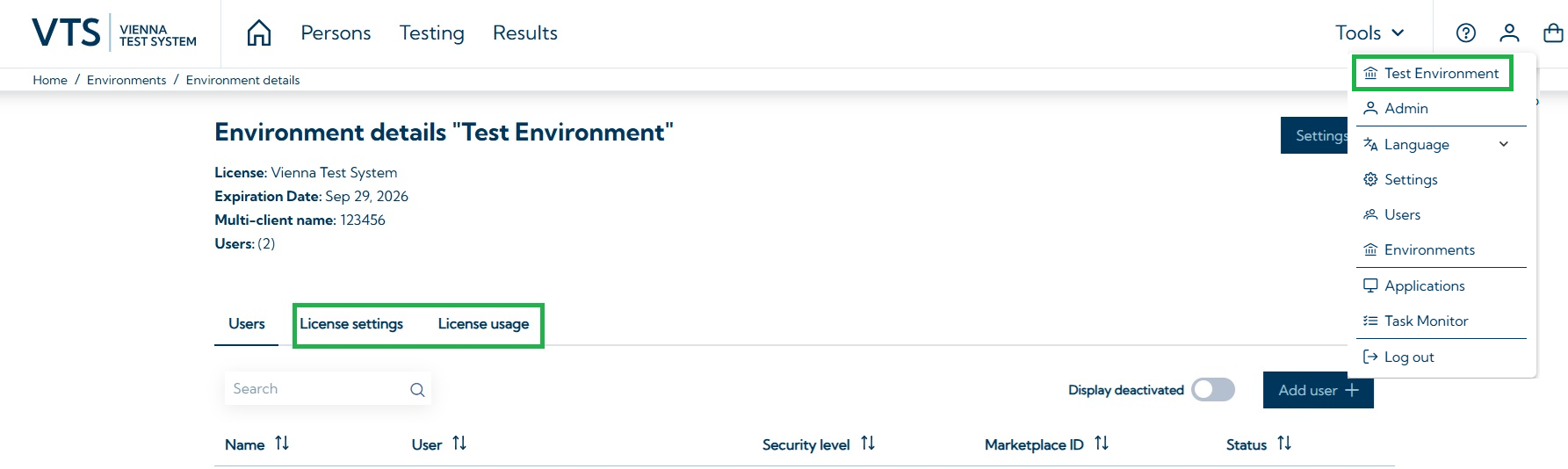
Open Environment details page (see screenshot below)
-
Navigate to license settings
There you can see all remaining licenses, including:
-
Test licenses: remaining licenses for individual tests, test sets, and the SCHUHFRIED Selection (SFS)
-
Report licenses: remaining licenses for Premium Reports
-
System licenses: details on licenses for the VTS Admin Client/Portal, including the number of concurrent users and the license expiration date
To view how many licenses have been consumed in your Environment(s):
-
Open Environment details page
-
Navigate to License usage
-
Define the time period to display consumed licenses
Information on how to install licenses can be found on the page Install licenses. Licenses can be purchased on our Marketplace.